
Fighting Ransomware: Part Six – Recover Data Fast with ONTAP Snapshot Copies

Matt Trudewind

Everyone knows that the quickest way to recover from a ransomware attack is to restore from backup. It sounds simple enough, but the actual restore process can be complex, not to mention slow.
- Has the backup data also been encrypted?
- Are the backups that I need still there?
- How much time will it take to restore the encrypted data?
- Will restoring the data affect my production workload?
This is the sixth and final post in a blog series that discusses how you can detect and prevent ransomware by using native NetApp® ONTAP® features, recover quickly from an attack, and avoid paying the ransom. If you missed the previous posts:
- The first entry covered the objectives of cybercriminals and the largest portion of the cost of a ransomware attack, which is not the ransom.
- The second entry focused on ONTAP native tools that you can use for early detection of a ransomware outbreak.
- The third entry took a deep dive into NetApp FPolicy® native mode, which helps prevent most older types of ransomware that are still prevalent today.
- The fourth entry focused on how to prevent the most modern variants of ransomware, including “zero-day” exploits, by using FPolicy external mode.
- The fifth entry highlighted the three key steps to successfully recover from a ransomware attack. I highly recommend reviewing it before reading this sixth entry.
First, let’s set the baseline about what snapshots are and how they can be very different from one storage vendor to another.
What are snapshots?
A snapshot is simply a point-in-time, read-only copy of your data. It represents exactly what your data looked like at the moment that the snapshot was taken, whether it was hours, days, weeks, months, or even years ago. Because Snapshot copies are read only, they can’t be infected by ransomware. You can appreciate how valuable this is for recovering from ransomware—you can simply restore from a snapshot that was taken before the attack occurred. As with most things, though, the devil is in the details.Although snapshot technology has been around for decades, not all snapshots are created equal. If you’ve ever heard that snapshots are slow or cause performance issues, that may be because the snapshot technology in use was copy-on-write (COW). With COW, whenever there is a change to the active file system data, the original data is moved into a special snapshot area on disk, and the changed data is written back to where the original data was located. This requires a read of the original data and two writes: one write for the original data and another write for the changed data. You can see how this slows things down. When you restore this snapshot, you also need to wait for the original data to be copied from the special snapshot area to the active file system. This can be very time consuming and performance intensive, depending on how much data you are restoring.
ONTAP Snapshot copies are quite different.
Advantages of ONTAP Snapshot Technology
ONTAP Snapshot copies use a concept known as redirect-on-write (ROW), which has significant advantages over COW. ONTAP needs to write the new changed block only once and then update the active file system to point to the newly written block. As shown in the following figure, there’s no need to move data when creating a Snapshot copy.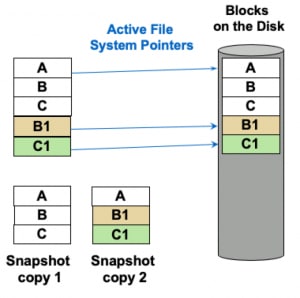 It gets even better when you restore using an ONTAP Snapshot copy. The ONTAP file system simply updates the active file system pointers to reference the original blocks. This leads to restores of terabytes in seconds, because there’s no need for the file system to move the data. It’s incredibly fast. This is what the file system would look like after the restore.
 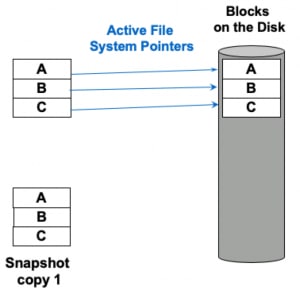 Let’s recap. ONTAP Snapshot copies don’t have a performance penalty, and restoration of your data from a copy is insanely fast. At NetApp, we encourage you to turn on Snapshot copies and use them for backup. It’s part of the ONTAP core design. Since the release of ONTAP 9.4 two years ago, you can take 1,024 copies per volume.
Making ONTAP Snapshots ransomware resilient
Let’s take a look at the best way to use ONTAP Snapshot copies to recover from ransomware.As I mentioned earlier, snapshots are read only and can’t be infected by ransomware. There are a few steps that you can take when implementing snapshots to make sure that they’re always available for recovery.
- Snapshot retention period. Have an adequate snapshot retention policy to make sure that you’re keeping copies long enough to recover your data. You may not detect ransomware right away, and it has been known to lie dormant. If your snapshot retention period is not long enough, you might have deleted all of your snapshots from before the start of the ransomware infection and be past the recovery window. Ideally, keeping a few months (or more) of snapshots should make it much more likely that you’ll be able to recover from dormant or slow-moving ransomware.
- Snapshot autodelete: Make sure that snapshot autodelete is turned off. Ransomware creates a high rate of change for your data because it encrypts the file system. The ONTAP file system holds all of the encrypted data plus the original unencrypted data in Snapshot copies. This uses more storage than normal, and volume space begins to fill up. Although snapshot autodelete is a great feature to keep volumes from filling all the way up, during a ransomware attack you would rather have a volume that’s full and still includes recoverable Snapshot copies than a volume with only ransomware-encrypted data and no recoverable copies. You can configure volume autosize to grow volumes that are nearly full to prevent them from filling up. When the volume is nearly full, you can set up an alert using thresholds, as described in the Active IQ Unified Manager 9.7 Workflow Guide for Managing Cluster Health.
cluster1::> snapshot modify -vserver SVM1 -volume * -snapshot * -expiry-time "12/31/2030 12:00:00"
- Snapshot autodelete prevents snapshots from being deleted automatically, but they can still be deleted manually by an administrator. This can happen through human error, or a disgruntled employee, or someone maliciously using stolen credentials. This is where NetApp SnapLock® comes into play. SnapLock is NetApp’s write once, read many (WORM) compliance solution that prevents changes to files once they are written and committed to WORM state, making the copies truly immutable. There are two license versions: SnapLock Compliance (SLC) and SnapLock Enterprise (SLE). For ransomware protection, NetApp recommends SLC because it prevents even ONTAP administrators from deleting Snapshot copies and enables you to set the specific retention period during which those copies are locked and cannot be deleted. Learn more about SnapLock in Technical Report TR-4526, Compliant WORM Storage Using NetApp SnapLock.
Remember that Snapshot copies are just like traditional backups (although they restore a lot faster) and should be treated like a backup. Make sure that they:
- Go back far enough (retention period)
- Can’t be destroyed (turn off autodelete and use SnapLock)
If a ransomware attack occurs you should contact NetApp Support to see if they can assist with data recovery. To win the battle against ransomware, though, you need to consider more than just maintaining local Snapshot copies for backups.
An ecosystem approach to ransomware recovery
You may have heard someone say, “I have a DR site, so I already have a backup.” However, if your DR site has data replicated to it from the primary site, then after a ransomware attack, you’ll end up with encrypted data at both sites. This is just one example of why you need a comprehensive ecosystem strategy for ransomware recovery. For example, this diagram shows what a typical approach across your organization might look like.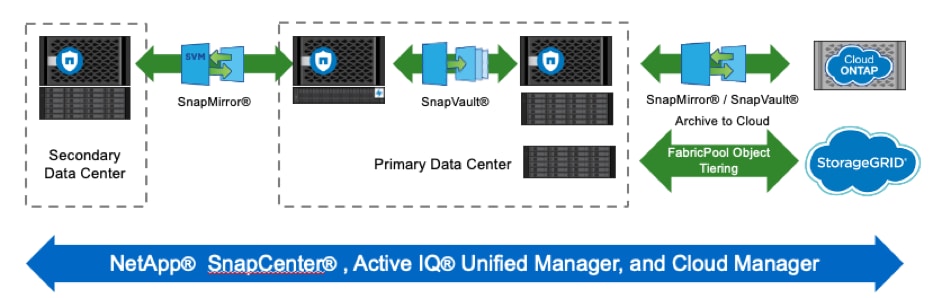
- SnapMirror® on the primary system is used to send active data and local Snapshot copies to a DR site in a secondary data center.
- SnapVault® is used to move copies to a local FAS hybrid-flash system with NL-SAS disks for longer-term retention of Snapshot backups on a system that offers lower total cost of ownership (TCO) than the high-performance primary ONTAP cluster.
- StorageGRID® object storage can be used to tier Snapshot data from both primary and secondary systems for even lower TCO.
- SnapMirror and SnapVault can additionally be used for replicating data to a cloud environment using Cloud Volumes ONTAP in a public cloud provider (AWS, Microsoft Azure, and Google Cloud).
- NetApp SnapCenter®, Active IQ®, Unified Manager, and Cloud Manager can all be used to manage your ecosystem simply and efficiently
These features all leverage the power of ONTAP Snapshot technology, ensuring that you have efficient ransomware restoration capabilities, no matter where that data resides throughout your entire ecosystem.
Putting it all together
ONTAP Snapshot technology is just one part of an overall strategy to fight against a ransomware attack and recover quickly. The restore methodology is crucial, but you still need to have a solid detection and prevention strategy, which we covered in blogs 2, 3, and 4.Ransomware will continue to evolve in the future. NetApp is committed to further strengthening our ransomware solutions to help you keep your data safe. Stay tuned to this NetApp blog site as we continue to update you with the latest information about ransomware and what you can do to fight back against it.
For more information about the NetApp solution to ransomware, check out our technical report TR-4572: The NetApp Solution for Ransomware. Plus, do you want to learn how you can further protect your organization with NetApp’s leading security portfolio? Check out the ONTAP Security webpage for information on using a data-centric, zero-trust approach to security, evaluating your security readiness, encrypting your data at rest or in flight, and more.
This is the final installment of the current blog series on fighting back against ransomware, and I hope that you now feel empowered. You can avoid costly downtime—and you don’t have to pay the ransom when you have a ransomware strategy in place that’s based on the leading capabilities that are built in to NetApp ONTAP.
Matt Trudewind
Matt is a Security Evangelist at NetApp with a focus on ransomware prevention, cyber resiliency, and data-centric portfolio security. With 25 years of IT experience, he specializes in Zero Trust, Data Governance, Encryption, Security Tools, and Best Practices. Matt has held various roles at NetApp, including Product Manager and Technical Marketing Engineer for ONTAP Security. He also has extensive expertise in networking, SMB/CIFS, and Microsoft technologies. Matt's passion lies in driving the latest security features and capabilities to ensure customer success.
