NetApp Console: One secure, simplified management interface

Share this page

Naveen Chand
In today’s enterprise IT landscape, complexity is the silent barrier to agility. Storage footprints are expanding, workloads are diversifying, and data now resides across on-premises systems, multiple clouds, and remote sites. And the tools used to manage these environments often remain fragmented—each with its own login, workflow, and learning curve. Use of these disparate tools slows response times, increases operational risk, and makes it harder to see the full picture.
The new NetApp® Console changes all that. Console delivers a secure, consolidated, streamlined management interface for your NetApp Data Services and storage—bringing clarity, speed, and resilience to your operations. Designed for the way that IT teams work today and built to scale for tomorrow, NetApp Console empowers your leaders and administrators to take command of your organization’s infrastructure with confidence.
Following is an example of how NetApp Console unifies systems management.
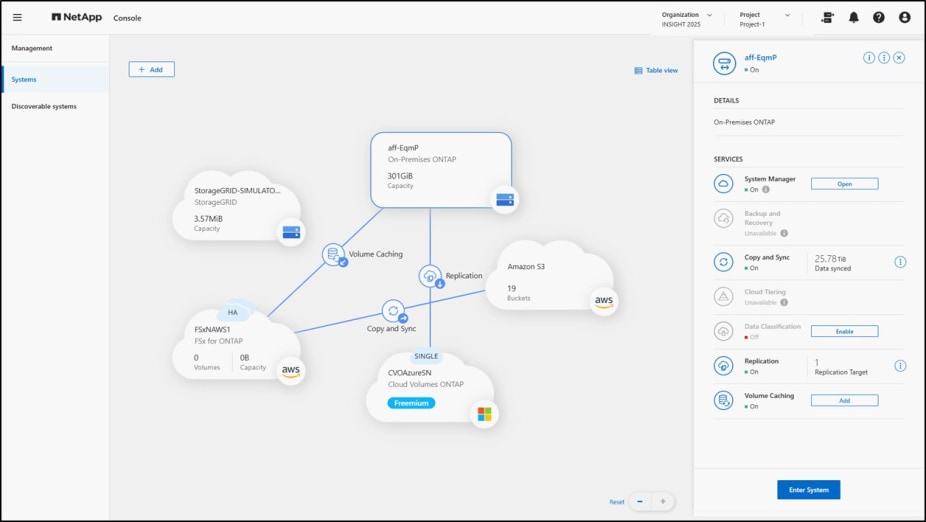
Your command center for NetApp operations
NetApp Console brings together the capabilities that you need to deploy, to configure, to monitor, and to maintain your NetApp environments, whether they’re in the data center, in the cloud, or across multiple geographies. Its modern, intuitive interface removes the friction of switching between different tools and workflows, enabling faster, more consistent management.
At the core of this experience is the Console home page, a central hub that gives you operational clarity immediately. As the following example Console home page shows, interactive dashboards present live metrics on performance, capacity, protection status, and recent activity in one consolidated view. These visual insights don’t just report—they reveal emerging trends and potential issues early, so your teams can take decisive action before service levels are affected. Quick access to demonstrations, resources, and key features keeps critical tools within reach, reducing the time from awareness to resolution.

Automation that works for you
Manual, repetitive processes slow progress and increase the risk of errors. Console replaces manual processes with intelligent automation that streamlines administration and reduces risk.
The Console onboarding assistant gets you operational quickly, guiding account association, agent deployment, and marketplace connectivity. The simplified Console agent deployment, through either an on-premises Open Virtual Appliance (OVA) or a wizard in the cloud, makes the process easy and more streamlined than with other interfaces. After it’s running, the Console agent secures connectivity between your environments while providing centralized monitoring and administration.
Smart, automated workflows are built into Data Services, as well as storage discovery, deployment, management, and more. And powerful APIs enable easy integration into your existing automation stacks to further simplify your operations. Subscription and license management tools give you real-time insight into usage patterns and costs, empowering you to optimize your resources and to align your spending with your strategic priorities.
Security-first by design
With the rapid increase and evolution of threats these days, security must be embedded into every layer of your operations. NetApp Console is engineered with a security-first foundation, incorporating identity-verified access, least-privilege permissions, multifactor authentication, and federated identity so that only authorized users can act—without exception. The following figure shows the extensive identity and access controls in Console when you add a member to your organization.
Fine-grained access controls enable secure collaboration with your external partners, while read-only modes provide safe visibility without the risk of unintended changes. Real-time monitoring and anomaly detection help flag unusual activity early, and comprehensive auditing strengthens governance and your compliance readiness for standards such as HIPAA, SOC 2, and Texas state and local mandates.

Ready for what’s next?
Whether you’re managing a single NetApp ONTAP® cluster or dozens of systems across multiple sites, NetApp Console delivers a centralized, intelligent, and secure management experience. With Console, you can meet the demands of modern IT while scaling to support your organization’s future growth.
One Console. Simplified Operations. Security First.
Take command of your NetApp Data Services and storage with NetApp Console:
- Excited to learn more? Read the solution brief.
- Want to kick the tires? Try these guided demos.
- Ready to get started? Log in to NetApp Console.
Naveen Chand
Naveen Chand is a seasoned technical leader with more than 20 years of experience in product vision, strategy, and software delivery. Currently a vice president of product management at NetApp, Naveen has held key roles at Google, Okta, and Microsoft, driving innovations in cloud services, messaging, and security. Naveen graduated from the University of Waterloo with a bachelor’s degree in mathematics.
