
A match made in heaven: best practices for StorageGRID and FabricPool

Ahmad Edalat
 NetApp® StorageGRID® object-based storage and the NetApp ONTAP® FabricPool feature are just meant to work well together. If you follow best practices when you use StorageGRID and FabricPool to improve how you store your applications and data, you can make sure that the two are a heavenly match.
In today’s world, your applications demand the high performance you get with all-flash and primary disk systems. But it’s costly if you use those systems for inactive data. By having FabricPool tier cold blocks to low-cost object-based storage, you save money and free up your high-performance space for your applications.
StorageGRID is a high-performance, distributed, object-based storage system with a powerful, intelligent policy engine. With the StorageGRID Information Lifecycle Management (ILM) engine, even your applications that need the highest level of performance, such as analytics and Internet of Things (IoT) applications, can work at their best. With ILM, you can use erasure code with data across sites or within sites for high durability and storage efficiency. Or you can replicate objects to remote sites for fast access. ILM allows you to create policy rules at a granular level (even at the object level). If you want to automate the movement and durability of your data as it ages and your requirements change, you include multiple rules in a single policy.
When StorageGRID stores data as an object, you access it as one object, regardless of where it is or how many copies exist. In this way, StorageGRID minimizes the cost of your hardware storage and increases the durability of your data.
FabricPool tiers 4MiB groups of NetApp WAFL blocks to StorageGRID. You store FabricPool tiering data locally at the StorageGRID site to make sure the tiered data is available for fast access. You can configure your FabricPool tiering policy in Auto, Snapshot-Only, and All tiering policies. For more information, see FabricPool Best Practices TR-4598.
StorageGRID ILM and data protection
StorageGRID ILM takes a two-level approach to erasure coding to protect your data. StorageGRID performs geographically distributed erasure coding at the software level, and uses NetApp Dynamic Disk Pools technology at the node level. Here’s an example: With ILM, you prevent disk failures that would result in network traffic. Storage controllers handle disk repairs. That all results in minimal disruption in client ingest activity. At the hardware level, your data is divided into either 8 data drives and 2 parity drives or 16 data drives and 2 parity drives. This division of your data uses NetApp’s patented Dynamic Disk Pools technology, which gives you disk and volume repair times that are much shorter than when you use traditional RAID technology.
Because erasure coding increases your storage efficiency, you might want to choose it for your FabricPool workloads. There are many erasure coding (EC) schemes to choose from, but some give you higher storage efficiency and performance.
For FabricPool, we at NetApp recommend one of two EC schemes. Which you choose depends on whether your priority is ease of expansion or storage efficiency. To keep latency as low as possible, use only intra-site EC schemes.
- EC 2+1: for ease of expansion, minimum four nodes required
- EC 4+1 or 6+1: for best storage efficiency, minimum six or eight nodes, respectively, required
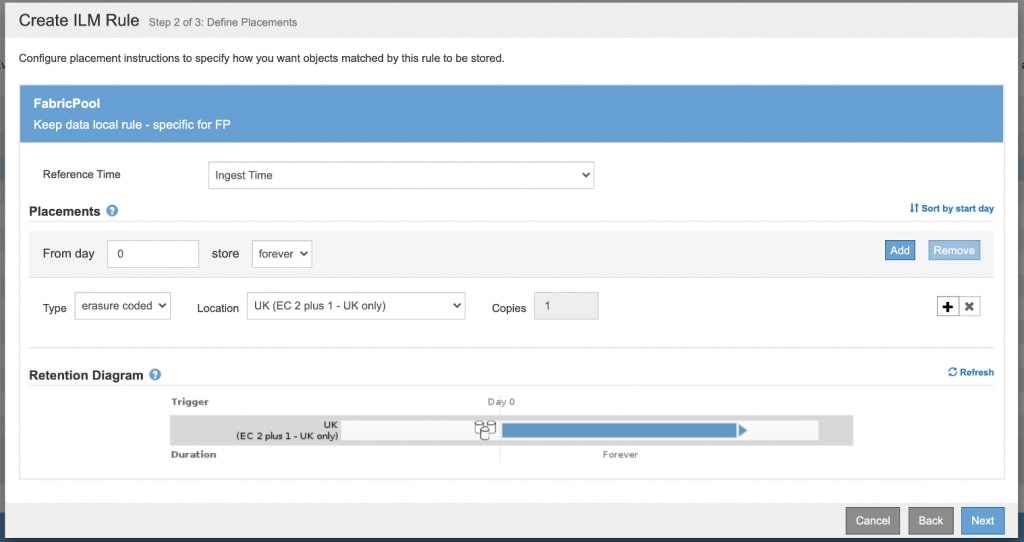
StorageGRID ILM and ingest behavior
Versions of StorageGRID earlier than 11.3 always make two complete replicated copies of data at time of ingest, acknowledge the client about the replication, and then apply the ILM rule. This behavior is called Dual Commit.Starting with StorageGRID 11.3, you can configure ingest behavior to suit your Simple Storage Service (S3) workloads. This table summarizes the different ingest behavior options you can choose for an ILM rule:
| Option | The rule’s resulting ingest behavior |
| Strict | Always uses the rule’s placement instructions on ingest. Ingest fails when the rule’s placement instructions can’t be followed. |
| Balanced (Default starting with StorageGRID 11.3) | Attempts the rule's placement instructions on ingest. Creates interim copies when that is not possible. This gives optimum ILM efficiency: It is the best choice for FabricPool workloads.
|
| Dual Commit (Default in versions of StorageGRID earlier than 11.3) | Creates copies on ingest and then applies the rule's placement instructions.
|
The Balanced option is the default ingest behavior of StorageGRID versions 11.3 and later. It is the optimal choice for a FabricPool workload.
High-availability groups (new feature as of StorageGRID 11.3)
High-availability (HA) groups are used to provide highly available data connections for S3 application traffic. You can create HA groups either on the grid or on client networks. A virtual IP (VIP) address is assigned to the active node in a group. If the active node fails, another node in the HA group takes over and starts serving the Simple Storage Service (S3) traffic while minimizing disruption in client ingest activity.For FabricPool workloads, NetApp StorageGRID team recommends that you create separate HA groups for each site on the grid network. If you have other S3 workloads grouped with FabricPool, you can leverage the client network and create an HA group specifically for your client applications. This leveraging allows the systems running ONTAP to share the grid network as a secure and high-performance replication network that is separate from S3 applications. The other S3 workloads (non-FabricPool) can leverage the Untrusted Client Network feature. If you enable the feature, inbound connections are accepted only on ports explicitly configured as load-balancer endpoints by the StorageGRID administrator for S3 application traffic.
An individual HA group gives you active backup, because one node at a time is actively serving S3 traffic. When you have multiple HA groups with different nodes active in each group, and you want to distribute the load across the VIP addresses of all the groups, there are two options. You can use round-robin DNS, or you can use a third-party load-balancing solution.
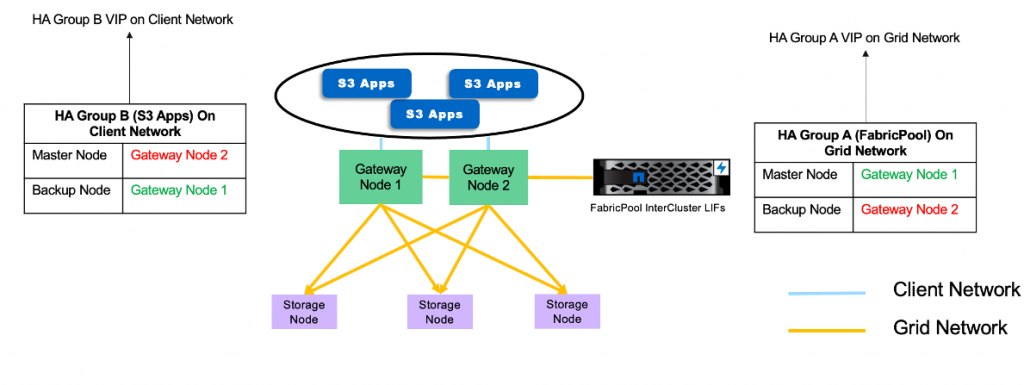 Here’s an example of HA groups with different active nodes:
Note: HA groups and traffic classification policies are features part of the Load Balancer Service running on both Admin and Gateway nodes.
Traffic classification policies (new in StorageGRID 11.4)
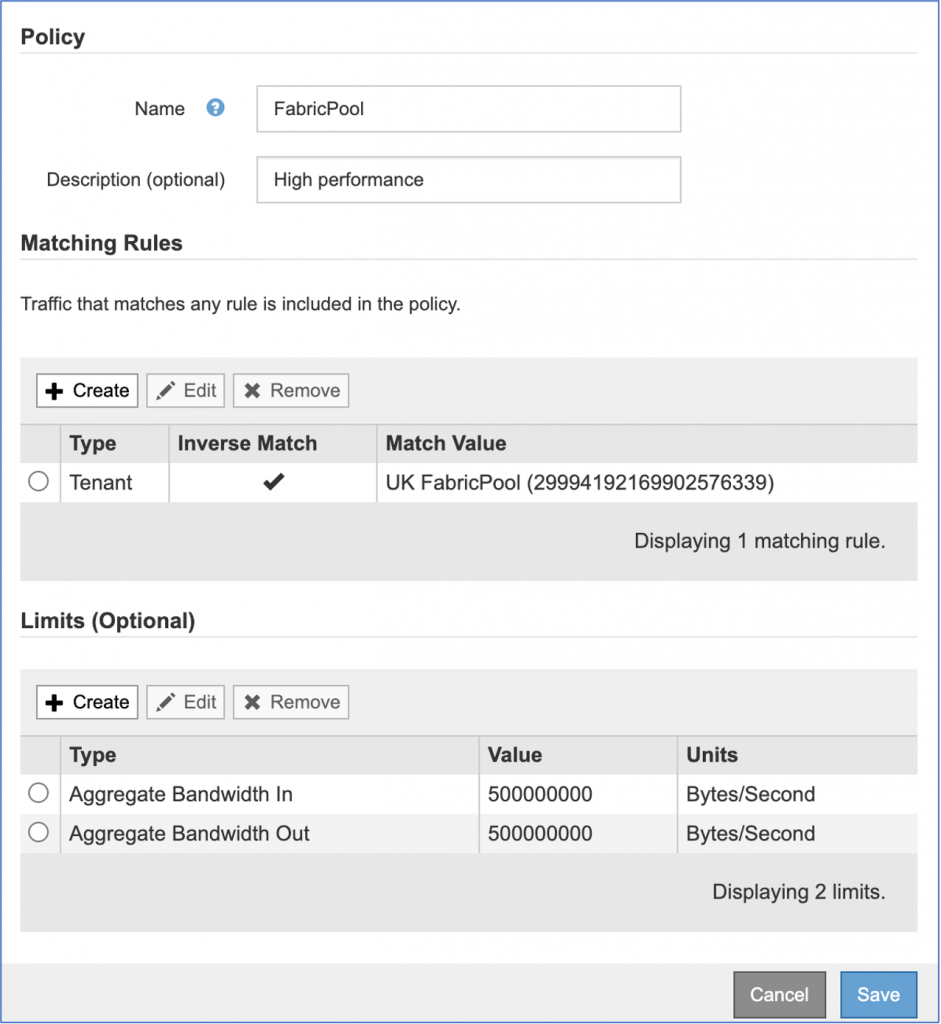
In the StorageGRID 11.4 release, we have added a feature that helps you monitor the traffic of every S3 application that interacts with your grid environment. You can define rules that distinguish high-priority and low-priority applications, to use the resources in your grid environment more effectively. You can limit bandwidth on the workloads that have a lower priority or a lower performance requirement. Or you can give more resources to applications that require higher performance or have a higher priority than other applications.For example, ONTAP FabricPool requires fast performance. On the other hand, applications such as backup especially long-term retention for which high performance is not required. You want to ensure that no application takes more than its share of resources.
You can set policies on a variety of matching rules. Each policy can be individually monitored and queried on Prometheus to gather metrics. You can create bandwidth limits at any of these levels: client subnet, endpoint, tenant, bucket, and bucket regular expression (regex).
Example: If you have FabricPool as one of your S3 workloads among other S3 applications on the grid, you have an option. To allow FabricPool to use more resources, restrict bandwidth on all other workloads. In the following example, we are restricting bandwidth incoming and outgoing to 500 megabytes per second for all workloads other than FabricPool.
 When you use NetApp StorageGRID as a FabricPool target, you get automatic, zero-touch tiering of inactive cold blocks into the high-performance, object-based storage tier. If you want to maximize the durability and efficiency of your storage while maintaining a high-performance environment, follow the best practices in this blog as well as the information available in FabricPool Best Practices TR-4598. That’s the best way to support the match made in heaven: the joining of StorageGRID and FabricPool.
Ahmad Edalat
Ahmad is a Technical Marketing Engineer in NetApp's Foundational Data Services Business Unit working on NetApp StorageGRID (On premise Object Storage). He holds a computer engineering degree from Simon Fraser University. He has a deep passion for emerging technologies and S3 / object storage in particular. He focuses on performance and partner integration testing of StorageGRID and partner applications. In his free time, he enjoys spending time with family and friends.
